Dell Inspiron 14 (5410): Detailed Review & Buyer’s Guide (2026)
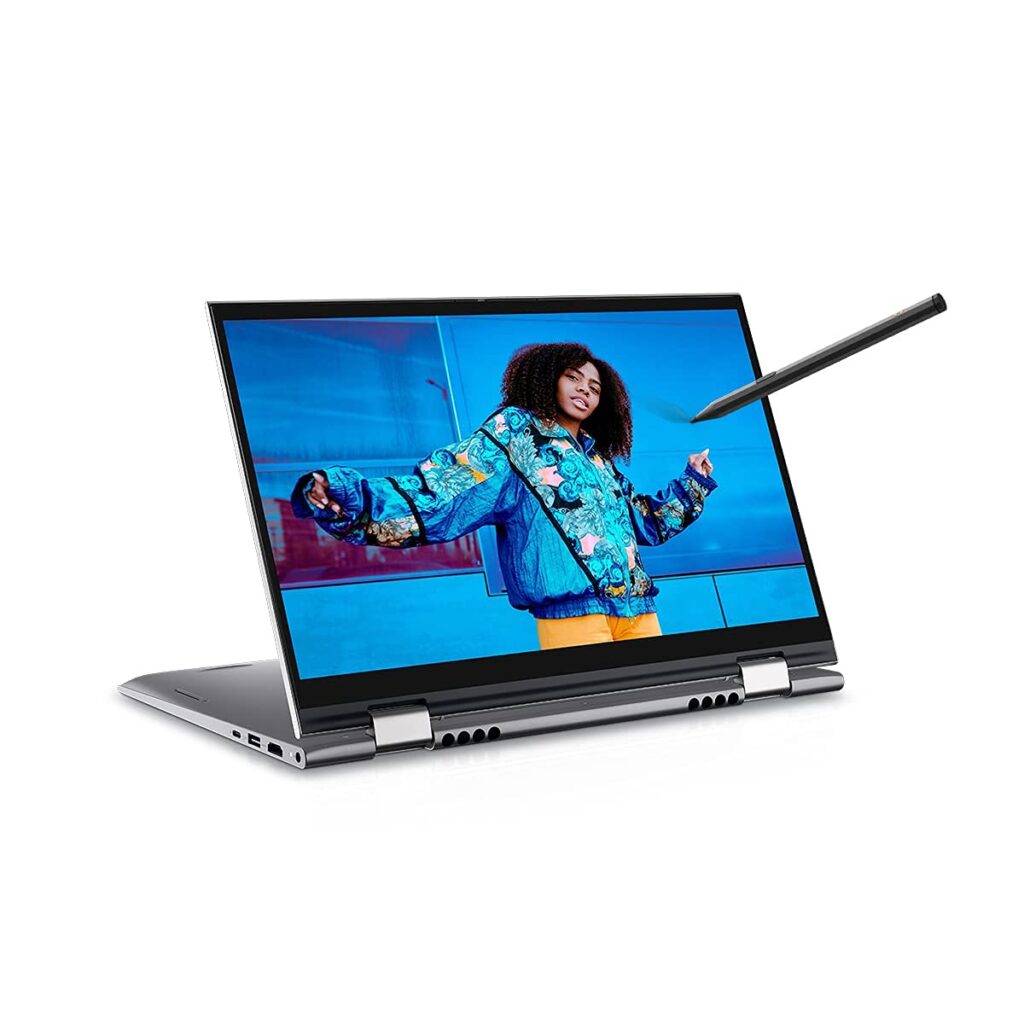
The Dell Inspiron 14 (5410) is a well-rounded mid-tier laptop that can cater to various uses by students, office-goers, and general consumers who seek a laptop that offers dependable efficiency within an efficient package. Its elegant design, robust build, and customizable specifications help make the device appealing to different types of consumers. Let us learn more about the laptop in this review.
Contents
- 1 Introduction to Dell Inspiron 14 (5410)
- 2 Design & Build Quality
- 3 Display Quality
- 4 Performance & Hardware
- 5 Battery Life
- 6 Keyboard & Touchpad
- 7 Audio & Web Camera
- 8 Ports and Connectivity
- 9 Advantages & Disadvantages of Dell Inspiron 14 (5410)
- 10 Who Should Buy It?
- 11 Dell Inspiron 14 (5410) vs Rivals
- 12 Price & Cost-effectiveness
- 13 Is It Worth Buying in 2026?
- 14 Coclusion
Introduction to Dell Inspiron 14 (5410)
Since its launch, Dell Inspiron laptops have been considered some of the most reliable laptops available within their price range. The new Dell Inspiron 14 (5410) comes equipped with:
- Intel Core 11th generation processor
- 14 inch screen size
- Portability and lightweight build
- Good battery backup
- Convertable 2-in-1 option
The laptop is perfect for:
- Students
- Professionals in offices
- Content creators
- Remote workers
Design & Build Quality
The Dell Inspiron 14 (5410) is notable for its high-quality design despite belonging to the mid-range laptop category.
Design Details:
- Top aluminum lid in some configurations
- Modern design with thin borders
- Compact size of 14 inches
- Weight of 1.4 – 1.5 kg
It also boasts an excellent hinge that operates smoothly. In the case of 2-in-1 laptop configuration, it will allow the user to rotate the screen by 360 degrees and convert it into tablet mode.
The overall build quality is durable and impressive.
Display Quality
The screen quality of the Dell Inspiron 14 (5410) is decent, with a resolution of 1920 x 1080 pixels on its 14-inch Full HD panel. It comes with a Wide Viewing Angle (WVA) display that has an anti-glare surface, making it easy to use for hours on end without eye strain. With screen brightness ranging from 250 to 300 nits, this model has decent illumination and works best indoors rather than outdoors where it might appear a bit dim.
In terms of color reproduction, this device can achieve 45% NTSC in basic versions and up to 100% sRGB in advanced versions, making the color display accurate and vibrant. This screen also boasts wide viewing angles, ensuring the same level of clarity irrespective of how the device is held. Nevertheless, this product would be less suitable for professionals in photo and video editing because it only operates at a speed of 60 Hz and does not have adequate brightness.
Performance & Hardware
Dell Inspiron 14 (5410) offers good performance that is powered by Intel’s 11th Gen processors such as i3, i5, and i7. The chips come with up to 4 cores and 8 threads that run at about 4.5-5.0GHz.
It is equipped with either 8GB or 16GB RAM DDR4 memory (speed of 3200 MHz) and fast PCIe NVMe solid-state drives (storage capacity of 256GB/512GB). This increases booting speed and faster application loading times.
In terms of graphics processing, the laptop comes with Intel’s Iris Xe Graphics (i5/i7 processors) that can be used for light games, video production, and other creative purposes. In some high-end variants, you will also find NVIDIA MX450 GPU.
On the whole, it is optimized for productivity, coding, multitasking, and even a bit of content creation but not much more than that.
Battery Life
The battery life of this laptop is definitely one of its best aspects.
Expected results:
- 6 to 8 hours of average use
- Rapid charging technology (up to 80% charge in about an hour)
Thus, it will be good for:
- Students going to class
- Working professionals
Keyboard & Touchpad
The Dell Inspiron 14 (5410) features a convenient and ergonomic keyboard layout that will help you comfortably work for hours. The device has a standard-sized keyboard with wide spacing between keys, offering great key travel. The keys provide excellent soft tactile feedback and are easy to use for students, writers, and office workers. Some upper versions come with backlighting that will be handy in low light conditions.
There is a high-quality touchpad that allows effortless scrolling, switching applications, and other operations using Windows precision drivers. The touchpad is big, sensitive, and has an accurate click mechanism.
All in all, both input devices have been carefully designed and optimized to make work easy and efficient. This laptop is great for regular productivity activities but should not be considered as a gaming one.
Audio & Web Camera
The audio on the Dell Inspiron 14 (5410) consists of dual speakers, which offer adequate sound using a Realtek controller. The speakers produce approximately 2 watts each, enough for typical activities like chatting, watching videos, and listening to music, but not enough for bass because there is no subwoofer.
In terms of communication, the computer uses a 720p webcam along with dual microphones, providing acceptable video quality and voice clarity.
Therefore, audio and webcam performance can be considered adequate for everyday purposes, but not suitable for professional video broadcasting.
Ports and Connectivity
The Dell Inspiron 14 (5410) is equipped with an adequate number of ports and advanced connectivity features that make the laptop a perfect choice for professional activities and leisure-time entertainment. In addition to the two USB 3.2 Gen 1 Type-A ports, the laptop features one USB Type-C port, which allows for data transfer at ultra-fast speed and connecting an additional display with DisplayPort. More expensive models are equipped with Thunderbolt 4, which allows for even faster data transfer and connection of multiple high-resolution displays.
To facilitate video playback or watching movies on the laptop, the product can be easily connected to additional monitors or TVs using the HDMI 1.4 port and microSD card reader. Moreover, the laptop features a 3.5 mm audio jack for headphones.
Regarding wireless connections, the computer is compatible with Wi-Fi 6 (802.11ax) for faster internet connection and Bluetooth 5.0/5.1.
Advantages & Disadvantages of Dell Inspiron 14 (5410)
Advantages:
- Fast Performance: With the 11th Gen Intel processors and the high SSD speed, multitasking is effortless.
- High Quality Construction: The aluminum body and sleek design make it attractive.
- Portable & Lightweight: The laptop weighs about 1.46 kg which makes it portable.
- Connectivity Options: The laptop is equipped with USB-C, HDMI, microSD card slots, and Wi-Fi 6 connectivity.
- Average Battery Life: The 54 Wh battery is sufficient for day-to-day use.
Disadvantages:
- Average Display Brightness: It is not recommended for outdoor usage or professional content creation.
- Heating & Fan Noise (as per some user reviews): Heat generation and noisy fans have been reported by some users under heavy loads.
- Basic Webcam: 720p webcam is good only for regular video calling.
- Lacks Gaming Performance: Dedicated graphics chip is required for efficient gaming.
- Battery Performance Decline: Battery condition deteriorates with time.
Who Should Buy It?
Dell Inspiron 14 (5410) targets customers looking for a middle ground in terms of processing power, mobility, and cost while avoiding the expensive segment of laptops. This computer model will be suitable for students as it runs online courses, homework, academic researches, and other assignments using 11th Gen Intel processors and SSD drives.
Office staff members and telecommuters will also find it convenient to perform their tasks using Dell Inspiron 14 because it supports product management software applications, video conferencing services, and web-based platforms efficiently. The laptop has a portable body weighing about 1.46 kg, allowing it to move from one place to another effortlessly.
It can also serve as a good device for casual consumers and newcomers to computers who require an effective tool for accessing content on the internet, streaming videos, and multitasking. Besides, novice developers and coders can use the computer comfortably for coding languages.
However, the laptop should not be considered by heavy gamers, advanced video editors, or graphic designers since it does not come with strong graphics cards.
Dell Inspiron 14 (5410) vs Rivals
In contrast to other laptops in the same category:
- Higher build quality compared to most low-cost laptops
- Comparable performance with HP Pavilion models
- Slightly higher durability than certain cheaper laptops
Price & Cost-effectiveness
In 2026, the cost of the Dell Inspiron 14 (5410) will vary based on its configuration:
- i3 version: Inexpensive
- i5 version: Best value for money
- i7 version: High-end
The best option would be the i5 version, which comes with 8GB/16GB of RAM.
Is It Worth Buying in 2026?
For 2026, it can be stated that it’s still worth buying Dell Inspiron 14 (5410) but only for some specific types of users. Although it’s not an up-to-date laptop, it still remains capable of working efficiently due to such components as 11th Gen processors, fast SSD drive, and overall reliable construction. However, it can work well for browsing, studying, work, and other daily activities.
But there’s one problem. Nowadays, technology doesn’t stand still, which results in the appearance of new models that have improved performance, increased energy efficiency, and much brighter screens. Therefore, comparing the Inspiron 5410 with current 12th/13th generation laptops would make it seem outdated and old.
Why you should buy it in 2026:
- If you pay less for it
- If your requirements aren’t too strict
- If you trust Dell and know how their laptops work
Why it isn’t the best choice for 2026:
- If you’re looking for gaming/performance-oriented device
For those concerned with finances, the Inspiron 14 (5410) is still a solid choice; however, gamers and professionals may find better options elsewhere.
Coclusion
The Dell Inspiron 14 (5410) appears to be an efficient and practical machine that does not boast about anything, just delivers the performance needed. With such components as 11th Gen Intel processors, fast SSD storage, and an aluminum chassis, it will suit the needs of students, workers, and regular users well. In general, the laptop provides good multitasking and productivity without any performance issues.
What I appreciate in this computer is its balance, as it shows decent performance, portability, and a decent battery life all for the right price. The presence of modern technologies like Wi-Fi 6, USB-C port, and a backlit keyboard makes it even more useful.
Nevertheless, there are certain drawbacks of the product in question, which include insufficient screen brightness and the lack of power needed for gaming and professional work. Moreover, there are new models with more recent processors and energy efficiency.
If you need a cheap and practical computer for day-to-day activities in 2026, you may safely purchase the Dell Inspiron 14 (5410).